TLDR;
- SBOMs (Software Bill of Materials) give security teams an exact inventory of every dependency in their software, making it possible to respond quickly when new vulnerabilities appear. During incidents like Log4j, having an SBOM lets teams identify exposure in minutes instead of manually inspecting builds and containers.
- Different SBOM tools approach the problem in different ways. Some focus on fast generation and integration into CI/CD pipelines, while others emphasize lifecycle monitoring, governance, and policy enforcement. Choosing the right tool helps avoid blind spots or overwhelming noise.
- Using SBOM, QA testers can flag unapproved packages before release, AppSec managers can prioritize remediation when a Common Vulnerabilities and Exposures (CVE) is disclosed, and compliance teams can confirm license obligations without manual audits. Each role benefits from a clear, structured view of dependencies.
- Tools auto-generate SBOMs, enrich them with vulnerabilities, and provide context. OX Security tracks PBOMs, Syft and Grype scan lightweight, Trivy integrates checks, Dependency-Track monitors long-term, and Snyk integrates SBOMs into workflows.
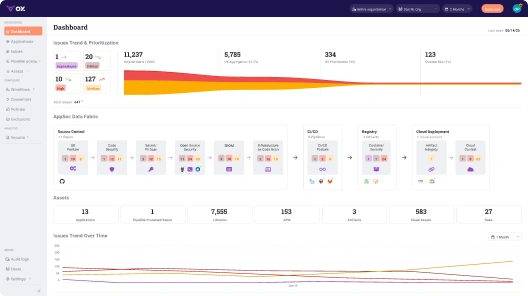
- OX Security brings Active ASPM to SBOM workflows. It doesn’t just list components; it keeps them constantly verified, tracked, and enforced across builds and runtime. OX turns SBOM data into an active security layer that lives inside your CI/CD, helping teams catch risks before they spread.
- Powered by VibeSec, OX stays aware of every change in your code, dependencies, and configurations. It’s the intelligence that keeps security alive throughout development, shutting out the risks before they appear in production.
Open-source components, libraries, and frameworks such as React, Express, and Spring Boot support software development by providing pre-built and well-tested functionality. Developers can integrate these instead of building common features like routing, authentication, or data processing from scratch.
Instead of rebuilding the same functionality like user authentication, data validation, logging, or machine learning pipelines from scratch, we can focus on delivering features that matter to our users. This reuse makes development easier, but it introduces security risks if dependencies are outdated, vulnerable, or misconfigured.
Every third-party dependency you add could open the door to a security vulnerability. And when your applications rely on hundreds of external packages, it becomes challenging to keep track of versions, licenses, or even which components are in use at all. That’s where the SBOM is useful to keep visibility and control.
SBOM gives you a clear inventory of everything inside your software, including names and versions of dependencies. It acts as a single source of truth that makes it easier for security teams and customers to identify vulnerabilities, confirm license compliance, and respond quickly to new threats.
The shift is already happening across industries. After the U.S. Executive Order 14028 called for greater supply chain transparency, more organizations began treating SBOMs as mandatory.
Recent surveys show that most enterprises are either generating SBOMs today or planning to roll them out soon. For QA testers, AppSec managers, and security teams, the SBOM is no longer a nice-to-have report; it is becoming the foundation of software assurance. So, in this blog, I’ll list down the top 5 SBOM tools that are a great pick for QA testers and Appsec engineers.

What Is The Software Bill of Materials (SBOM)?
A Software Bill of Materials (SBOM) is a comprehensive, machine and human-readable record of all the components used in a software application. It tracks every third-party dependency incorporated into your project and provides important details, including:
- Package names: the libraries or modules used in the application
- Versions: the exact release numbers for those packages
- Licenses: the legal terms under which each component is distributed
- Dependencies: both direct dependencies (the libraries you explicitly install) and transitive dependencies (the libraries those packages themselves rely on)
SBOMs serve multiple purposes. Software producers provide visibility into all third-party components, making it easier to respond to security vulnerabilities, license changes, or updates in dependencies. For software operators, SBOMs are valuable for asset management, license compliance, and supply chain risk assessment.
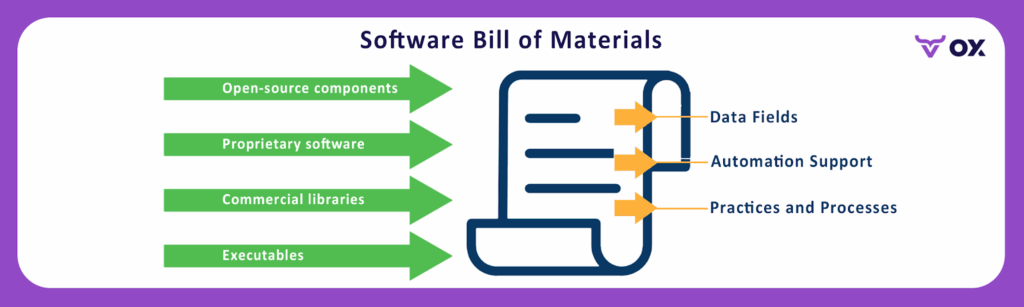
This diagram shows the structure and purpose of an SBOM. It highlights how different types of software elements: open-source components, proprietary software, commercial libraries, and executables, are collected into a single record.
SBOMs for actual APIs or software can be generated using automated tools that scan the codebase, dependency manifests (like package.json, pom.xml, or requirements.txt), container images, or compiled binaries. These tools pull component metadata, including version, license, and origin, and output it in standard SBOM formats such as SPDX, CycloneDX, or SWID.
An SBOM doesn’t just list software components. It also defines data fields that describe each item, provides automation support so security and compliance tools can process it, and establishes processes to keep it updated over time. Together, these elements make SBOMs practical for tracking dependencies, automating vulnerability checks, and standardizing compliance workflows.
Instead of relying on developers to remember or manually list dependencies, security and QA teams can use an SBOM to see which libraries, frameworks, and open-source packages are present at any given time.
How Are SBOMs Produced?
SBOMs are not written manually. They are typically created by SBOM generators: tools that scan your codebase, container images, or build artifacts and output a machine-readable SBOM file. These files usually follow standardized formats such as:
SPDX (Software Package Data Exchange)
Maintained by the Linux Foundation, SPDX is a detailed and compliance-oriented format. It captures package information, licensing data, copyright notices, and security references.
Here’s an SPDX format written for tracking licenses and compliance in a software project:
SPDXVersion: SPDX-2.3
DocumentName: ExampleProject
SPDXID: SPDXRef-DOCUMENT

PackageName: example-library
SPDXID: SPDXRef-Package-example-library
PackageVersion: 1.2.3
LicenseConcluded: MIT
SPDX focuses on providing detailed information about each package’s license, version, and copyright, which is important for legal reviews and regulated industries.
CycloneDX:
Originating from the OWASP community, CycloneDX is a lightweight, security-focused SBOM format. It was developed to integrate with application security and DevSecOps pipelines, making it more practical for vulnerability scanning, component analysis, and supply chain risk assessments.
Here’s a CycloneDX format written for security and vulnerability tracking in DevSecOps pipelines:
{
  "bomFormat": "CycloneDX",
  "specVersion": "1.5",
  "components": [
    { "type": "library", "name": "example-library", "version": "1.2.3", "licenses":[{"license":{"id":"MIT"}}] },
    { "type": "library", "name": "another-library", "version": "0.9.1", "licenses":[{"license":{"id":"Apache-2.0"}}] }
  ]
}
CycloneDX is structured in JSON and focuses on components, their versions, and licenses, helping teams detect vulnerabilities and manage supply chain risks.
Many software composition analysis SCA tools natively support CycloneDX, which makes it common in CI/CD workflows used today.
Because these standards are widely adopted, the SBOM can be consumed by other tools in the security pipeline. For example, a vulnerability scanner can read a CycloneDX SBOM and immediately flag which components have known Common Vulnerabilities and Exposures (CVEs).
Here’s a brief illustration of how SBOMs are produced:
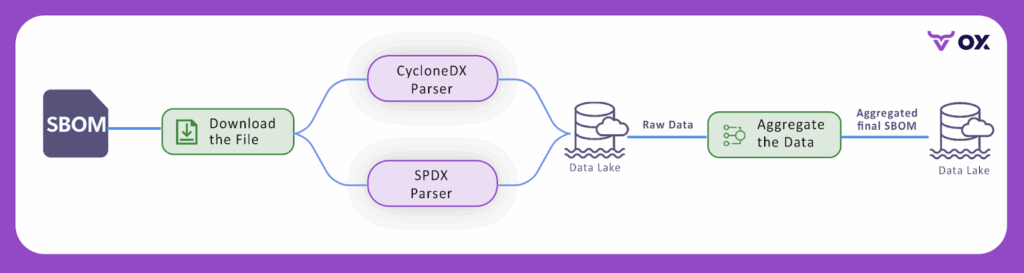
The diagram shows how SBOM files generated in different formats, such as SPDX or CycloneDX, can be parsed and ingested into a data lake. Once ingested, the raw information is aggregated into a unified SBOM that can be consumed by other tools in the security pipeline. This process ensures that regardless of the format used by the generator, the SBOM data becomes consistent, centralized, and ready for analysis.
SBOM For Security Teams
For security teams, an SBOM is not just a compliance report. It is an operational input that supports key workflows:
- Vulnerability triage: When a new CVE like Log4Shell or Heartbleed is disclosed, an SBOM allows me to immediately check which deployed services include the vulnerable library and prioritize remediation based on business impact.
- Incident response: During a security incident, knowing the exact versions and dependencies in use speeds up containment and remediation. Without an SBOM, teams are left to reverse-engineer container images or production systems to verify exposure.
- License and export control checks: Legal and compliance reviews often require verification of licenses. An SBOM provides this data, avoiding manual audits of repositories.
- Third-party risk assessment: When onboarding a vendor, requesting their SBOM allows us to assess the risk their software introduces before deployment.
For example, during the Log4Shell vulnerability disclosure, many organizations used their SBOMs to quickly query which applications depended on log4j-core and identify the exact version in use.
Instead of scanning servers one by one, security teams could pull up the SBOM, confirm exposure, and immediately push fixes to the most at-risk services. This kind of visibility shows why SBOMs are now integrated into routine vulnerability management and vendor security reviews.
Practical Realities Of SBOMs
Working with SBOMs also comes with some realities that AppSec managers should account for:
- Format differences: Not every SBOM generator provides the same level of coverage. For example, some may capture Node.js dependencies well but provide limited insight into compiled binaries or OS packages.
- SBOM aging: An SBOM generated at build time reflects that build, but over time, deployed containers and runtime environments may drift. Upfront regeneration or runtime validation is necessary to keep data current.
- Tooling gaps: A single tool rarely covers high-fidelity generation and lifecycle management. You may need to integrate tools, one for generating SBOMs, another for scanning vulnerabilities, and a third for tracking artifacts across releases.
Standards from the National Telecommunications and Information Administration (NTIA), along with minimum SBOM elements and current Software Composition Analysis (SCA) guidance, are made to help determine whether an SBOM meets operational needs. For security teams, the effectiveness of an SBOM is measured not by its existence but by its usefulness in workflows such as triage, incident response, and audits.
Why Use an SBOM Tool and Not Ad Hoc Scripts
I have seen teams use scripts to parse package manifests or container layers. This can work for single-use checks, but tooling matters for three reasons that affect security teams at first hand:
- Coverage and accuracy at scale: Tools like dedicated SBOM generators understand many package ecosystems and container formats. That reduces blind spots when you are auditing hundreds of images or dozens of third-party packages. Evidence: Widely used generators support SPDX and CycloneDX and detect OS packages plus language packages.
- Ongoing monitoring and lifecycle management: A tool that reads SBOMs and re-evaluates them against updated vulnerability feeds lets you track newly disclosed CVEs without re-scanning builds manually. Platforms exist to ingest SBOMs and run daily analysis.
- Auditability and provenance: Tools add signing, attestation, and integration with registries and Continuous Integration (CI) so you can show a chain of custody for a given build. This is important for procurement reviews and responding to regulators. The NTIA and industry guidance recommend including provenance metadata in an SBOM workflow.
Top 5 SBOM tools for AppSec Teams
Below, I have listed five tools I would evaluate first. For each, I have listed the benefits and limitations so that QA teams can evaluate which tool suits them the best. On top of that, here’s a table of comparison for a better overview:
| Tool | SBOM Generation | Vulnerability Scanning | Long-Term Tracking | Formats Supported | Best Fit |
| OX Security | Yes (with VibeSec and PBOM) | Yes | Yes (centralized inventory, CI/CD gating) | SPDX, CycloneDX | Enterprise security & compliance |
| Syft + Grype | Yes (Syft) | Yes (Grype) | No (requires external repo) | SPDX, CycloneDX | Lightweight pipelines & open source users |
| Trivy | Yes | Yes | Limited (no central repo) | SPDX, CycloneDX | Fast CI/CD scanning |
| Dependency-Track | No (consumes SBOMs) | Yes (via feeds) | Yes (constant monitoring) | CycloneDX | Lifecycle monitoring & vendor risk |
| Snyk | Yes (paid plans) | Yes | Partial (tied to platform) | SPDX, CycloneDX | Teams already using Snyk for SCA |
1. OX Security: Enterprise SBOM and supply chain platform

OX Security is an Active ASPM platform that brings application security, SBOM management, and policy enforcement together in one system. Instead of static scans and disconnected tools, OX provides autonomous prevention, a live security layer that moves with your software from code to runtime.
Through VibeSec, OX keeps protection always on. It constantly maps dependencies, configurations, and builds pipelines to generate both SBOMs and Pipeline Bills of Materials (PBOMs). These records stay alive and in sync as software scales, giving teams a real-time view of what’s running, where it came from, and whether it’s safe to deploy.
VibeSec™ is powered by the OX AI Security Agent and OX AI Data Lake, working together to understand the full software context. The agent runs alongside development and build processes, while the data lake constantly updates vulnerability intelligence and policy rules. This makes the system proactive, detecting risks as they form and blocking them from reaching production.
For AppSec and QA teams, OX enforces policies automatically in CI/CD. It blocks risky dependencies, unapproved licenses, and misconfigured containers before release. Unified alerts help developers, security, and QA work from the same context instead of chasing fragmented reports.
With constant PBOMs, AI-driven enforcement, and autonomous prevention, OX turns SBOM data into living assurance rather than static documentation. It’s a platform built for teams that want supply chain security to be automatic, connected, and always current.
The platform can create and import SBOMs automatically, track changes across every release, and make sure what runs in production matches what was approved. It keeps the software inventory always up to date through VibeSec, so teams have a clear view of what’s being built and deployed.
Pros
- Centralized SBOM lifecycle and production integrity features aligned with audit and compliance requirements
- Automated application of security policies in CI/CD, lowering down manual effort and risk
- Rich connector to CI/CD, registries, and ticketing, so findings quickly map to ownership
- Designed for enterprise scale, supporting visibility, compliance, and live threat context via VibeSec
Cons
- As with any platform offering broad integrations, you will need initial configuration and governance work to map projects, owners, and policies.
- The full feature is commercial; plan for procurement and onboarding cycles.
Hands-on example
When I tried out OX’s SBOM tool, the setup was quick, I connected it to my GitHub pipeline, and within minutes, it generated a complete SBOM for my project. The dashboard showed all dependencies, including transitive ones, with details like versions and licenses.
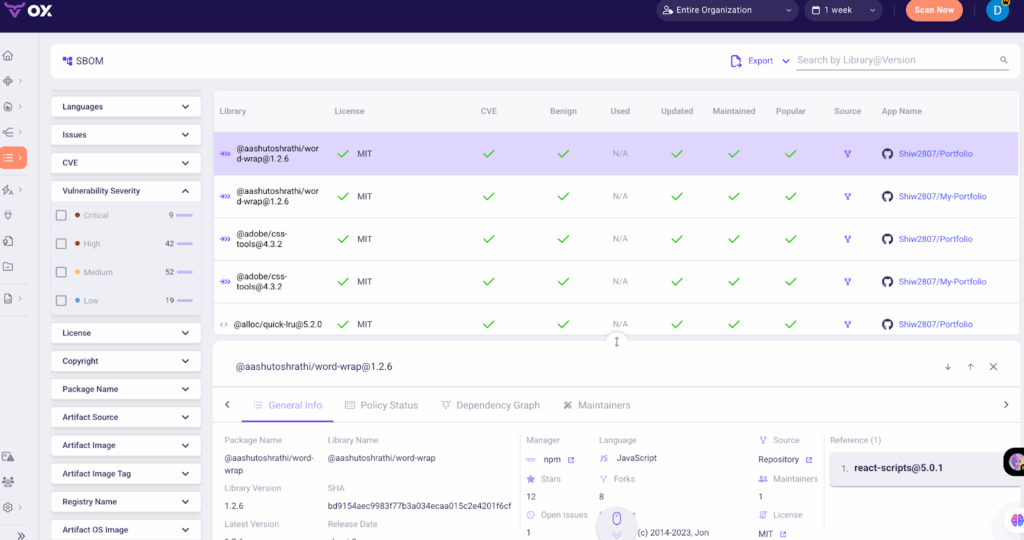
In the next build, it flagged that a new package had been added through npm install without approval, which could have been missed otherwise. The interface allowed me to drill down and see not just the library but also its lineage, how it entered the build, and where it was used.
The vulnerability list was sorted with clear priorities, so it was easier to focus on the issues that actually mattered for runtime. Exporting the SBOM in CycloneDX format for compliance was straightforward and took only a click. Overall, the process gave me a clear view of my dependencies and helped me track unexpected changes across builds.
2. Anchore: Syft (generator) and Grype (scanner)
Syft is a CLI and library that generates SBOMs from images, filesystems, and archives. Grype is a fast vulnerability scanner that can take an SBOM as input or scan images. Together, they provide a compact open source generator + scanner workflow.
Why I would pick it for security teams: For teams that need reliable, scriptable SBOM generation and fast batch scanning, Syft plus Grype is a practical choice. Syft supports SPDX and CycloneDX, and Grype can quickly scan SBOMs to produce prioritized vulnerabilities. This is useful for QA teams that want a lightweight pipeline step to output an SBOM artifact and get an initial vulnerability list.
Pros
- Open source and easy to run in CI.
- Good format support and the ability to pipe Syft output into Grype for fast scanning.
- Low friction for proof of concept and integrating into image-build pipelines.
Cons
- On its own, it is not a long-term SBOM repository. You will likely need a central server or platform to store, compare, and monitor BOMs over time.
- Some complex SBOMs or very large BOM files may need tuning for memory and processing when scanned at scale.
Hands-on example
I set up a quick test VM to try out Syft and Grype together. First, I generated an SBOM from a mounted filesystem using Syft, which created a JSON file describing all detected packages and dependencies. With the SBOM ready, I ran Grype against it using a simple command that listed the file and piped it into the scanner.
The screenshot shows the Grype output: it connected to the vulnerability database, parsed the SBOM, and reported 60 matches in total.
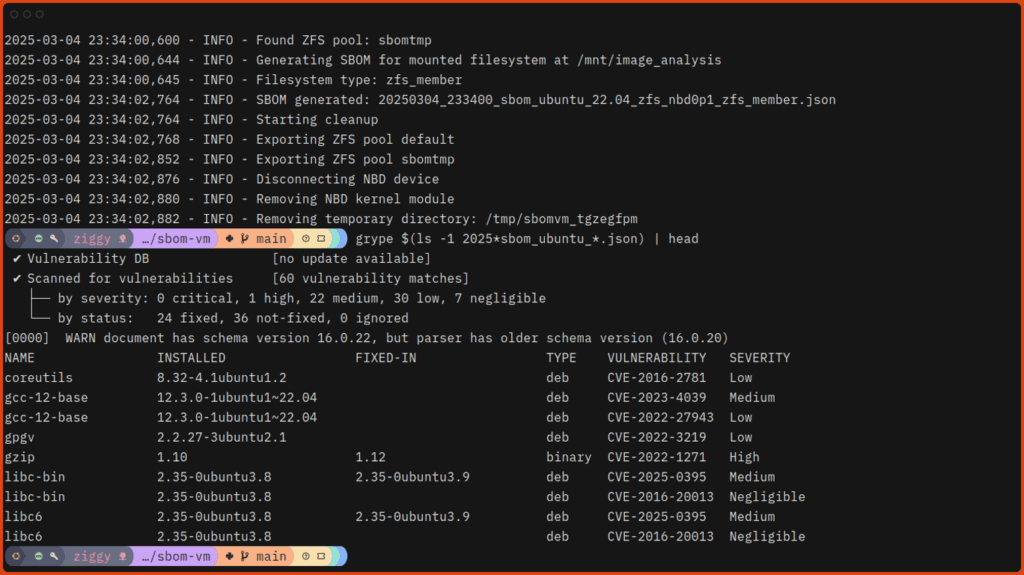
The results were grouped by severity: 1 high, 22 medium, 30 low, and 7 negligible, with fixed versions suggested where available. For example, gcc-12-base was flagged with a high-severity CVE (CVE-2022-1271), while coreutils and libc6 were marked with low to medium issues.
This kind of report is useful for security and QA teams because it provides a lightweight way to generate an SBOM and scan it for issues inside a CI pipeline, with outputs that can be stored or fed into other tools.
3. Trivy (Aqua Security)
Trivy is a vulnerability scanner that also supports SBOM generation and SBOM-based scanning. It outputs CycloneDX and SPDX and can scan images, filesystems and SBOM files. Trivy is widely used for fast container scanning and has integrations into CI and registries.
Why would I pick it for security teams: Trivy gives you a single tool that produces an SBOM and runs vulnerability checks. For QA teams running nightly builds or release validation, Trivy’s speed and format options make it useful as a deterministic gate. It also accepts SBOMs as input, so you can separate generation and scanning steps across different teams or systems.
Pros
- Fast, simple CLI and broad format support, including CycloneDX and SPDX.
- Can scan SBOMs, which lets teams avoid rescanning large images repeatedly.
Cons
- Like most scanners, it can produce findings that require context and triage to avoid noisy alerts.
- Integration for centralized long-term BOM lifecycle management will require a separate system or platform.
Hands-on example
I used Trivy to generate an SBOM for a container image and then scan it for vulnerabilities. Running:
trivy sbom alpine:3.15
This line created a CycloneDX SBOM in the terminal. Refer to this screenshot:
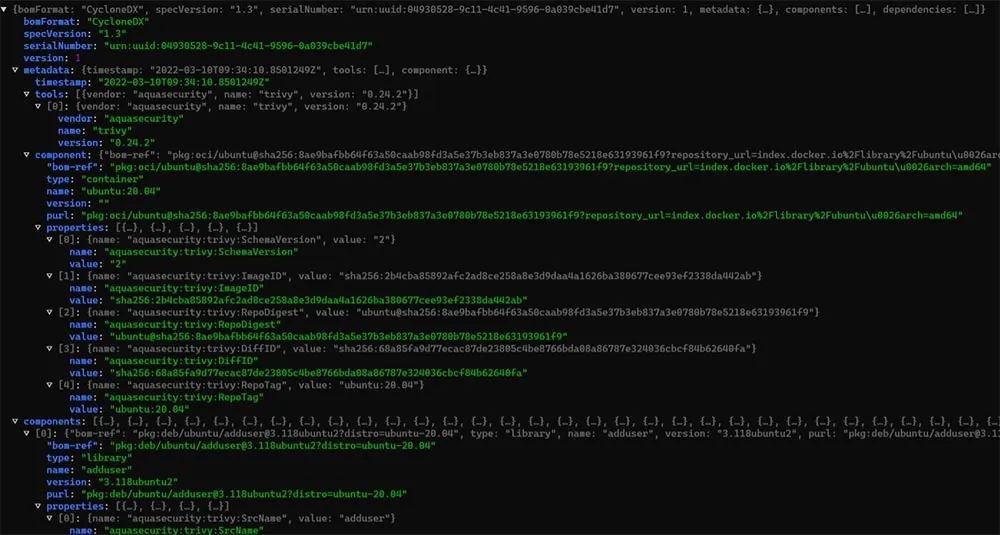
In the screenshot, the command outputs the SBOM for the alpine:3.15 image, listing each package and its metadata. This SBOM can be redirected into a file (e.g., sbom.json) for later use. Once the SBOM was saved, I scanned it for vulnerabilities with:
trivy sbom sbom.json
This second step parsed the SBOM and reported vulnerabilities grouped by severity, showing package names, versions, CVEs, and whether fixed versions exist. The combination of these two steps gave me both a reusable SBOM artifact and a quick vulnerability assessment without needing to rescan the image itself.
Trivy can fit naturally into a pipeline, producing artifacts for compliance while also giving developers and QA teams fast feedback on vulnerabilities.
4. OWASP Dependency-Track

Dependency-Track is an open source component analysis platform that ingests SBOMs (typically CycloneDX) and monitors them over time against vulnerability feeds. It is designed for long-term lifecycle tracking rather than one-off scans.
Why would I pick it for security teams? For AppSec and security operations teams responsible for enterprise-scale inventory and vendor risk, Dependency-Track provides a place to centralize BOMs, run policy checks, and report across projects. It is well-suited for teams that need an audit trail and automated re-evaluation when feeds update.
Pros
- Purpose-built for SBOM ingestion and upfront component analysis.
- API and CI integration patterns to automate BOM uploads and policy enforcement.
Cons
- It focuses on SBOM consumption and monitoring. It does not itself generate SBOMs, nor does it provide a full triage workflow the way some commercial vulnerability management platforms do.
- Very large BOM uploads may need tuning and operational monitoring. There are community reports about size-related issues that require architectural planning.
Hands-on example
To check the Dependency-Track SBOM tool, I used it by uploading a CycloneDX SBOM into a project via its API, and this is what showed up once the upload completed. The project dashboard has been updated to list all components extracted from the SBOM along with their associated vulnerabilities and compliance status.
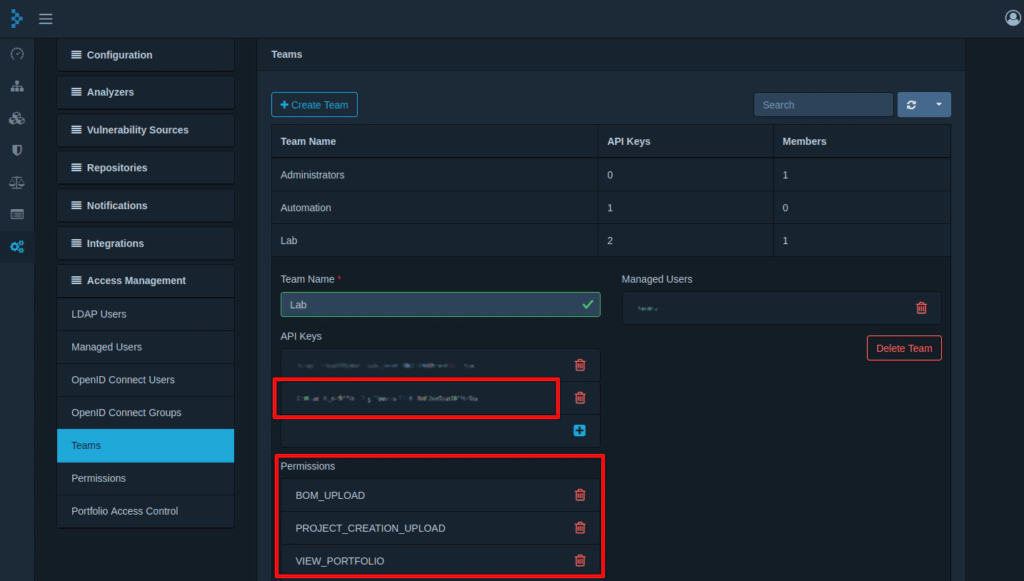
Color-coded policy violations highlighted areas that needed attention, and I could expand individual components to view CVE details, license risks, and when each risk was last evaluated. I also ran the same SBOM through the UI to compare; both routes resulted in the same responsive and organized overview.
This made it easy to see not just what components were in use, but whether any triggered policy rules, which ones had unresolved vulnerabilities, and how recently feeds had been used to re-evaluate the project.
5. Snyk: SCA platform

Snyk is an SCA and developer security platform that also exposes SBOM generation and retrieval capabilities for supported projects. It provides scanning, monitoring, and reporting and includes APIs and CLI commands to generate SBOMs. SBOM generation is available on Snyk paid plans for enterprise projects.
Why would I pick it for security teams? If your organization already uses Snyk for vulnerability monitoring, the SBOM features provide a way to export SBOMs and integrate SBOM generation into your reporting and governance workflows. For AppSec managers who want unified alerts, Snyk gives a path to include BOM generation in the same platform you use for ongoing monitoring.
Pros
- Enterprise-grade reporting, APIs, and integration into issue trackers and CI.
- SBOM generation supports multiple CycloneDX and SPDX versions.
Cons
- SBOM features are tied to paid plans and project import flows. That means procurement and entitlement need to be arranged for full automation.
- If you need an open source long-term repository for SBOMs, you may still pair Snyk with a platform like Dependency-Track or OX.
Hands-on example
To experiment with Snyk’s SBOM support, I used the CLI on a sample Node.js project. Here’s a snapshot of the terminal:

The screenshot shows the command running in the terminal, with Snyk producing an SBOM in JSON format. This file (sbom.json) can be stored as a build artifact or shared with other tools.
The next step was to scan the SBOM for vulnerabilities. Since the SBOM test feature is still experimental, I used:
snyk sbom test –experimental –file=sbom.json
Snyk ingested the SBOM, matched the listed dependencies against its vulnerability database, and returned results grouped by severity. Each entry included the package, affected version, CVE, and a recommended fix.
By splitting SBOM generation and scanning into two commands, I could keep the SBOM as a reusable artifact while still taking advantage of Snyk’s vulnerability insights. This pattern is useful in CI pipelines where one team might generate SBOMs during builds, and another can run audits on those same files later without needing to rebuild or rescan the source code.
Why Do I Prefer OX Security Over Other SBOM Tools?
When estimating SBOM tools against enterprise security needs, OX Security stands out because it extends simple SBOM generation. It delivers Active ASPM, a live security layer that keeps every component, dependency, and build pipeline verified and in sync with production reality.
The engine behind this model is VibeSec, OX’s AI-driven framework that turns static security data into autonomous prevention. It connects with your pipelines, IDEs, and runtime systems to keep protection active as code evolves. Instead of waiting for scans or tickets, teams work with a map of software lineage, ownership, and real risk, powered by AI context that updates itself.
- Pipeline Bill of Materials (PBOM): Most tools list dependencies from a single build. OX captures the entire software lineage, including build pipelines and container layers. This becomes useful when auditing supply chain integrity after an incident. For instance, in a SolarWinds-style attack, OX can show whether the compromised pipeline introduced unexpected components.
- Constant Vulnerability Context: Instead of one-time scans, OX enriches SBOM contents with new CVE data. During the Log4j vulnerability disclosure, many teams struggled to determine exposure across services. With OX, the PBOM immediately highlighted all applications using the affected Log4j versions, helping AppSec managers prioritize patching for customer-facing systems first.
- Focus on the 5% of risks that matter: Not every vulnerability is exploitable. OX analyzes reachability and runtime context to narrow focus. For example, when a CVE was disclosed in a transitive dependency of a Node.js package, OX identified that the vulnerable function was never invoked in production. Instead of diverting resources to a non-impactful issue, teams could focus on a container image running an exploitable Apache Struts flaw that was internet-facing.
- Policy Enforcement: OX enforces policies straight in CI/CD. If a build includes an unapproved license (such as GPL in a commercial application), OX can automatically fail the pipeline. Similarly, when a high-severity CVE is introduced into a Docker image, OX can block the release until the issue is fixed or an exception is documented.
For QA testers, this translates into faster license validation before release. For AppSec managers, it means reduced effort during incidents like Log4j. And for security teams, it ensures SBOMs become part of an ongoing risk management, not static files stored away.
Conclusion
SBOMs have become an important part of today’s application security. By providing a complete, machine-readable inventory of software components, they allow organizations to identify vulnerabilities, verify license compliance, and strengthen supply chain integrity. Formats like SPDX and CycloneDX standardize how this data is shared, ensuring interoperability across security, compliance, and DevOps tools.
When assessing SBOM tools, teams should prioritize capabilities such as format support, ecosystem coverage, automated ingestion, vulnerability enrichment, and enforcement mechanisms. A mature solution should also scale with enterprise workloads and integrate effortlessly into CI/CD pipelines, registries, and ticketing systems.
Ox Security goes further by addressing the limitations of generic SBOM tools. It not only generates and manages SBOMs but also focuses on the 5% of vulnerabilities that are exploitable, reachable, and truly impactful. This practical prioritization allows AppSec and DevOps teams to reduce noise, align security with business risk, and stop critical threats before they reach production.