TL;DR
- Application Security Posture Management (ASPM) pulls results from Static Application Security Testing (SAST), Dynamic Application Security Testing (DAST), Software Composition Analysis (SCA), and Infrastructure as Code (IaC) scanners into one view.
- It cuts noise by removing duplicate alerts and ranking what remains by exploitability and business risk, so teams work only on what matters.
- ASPM is the control layer for application security: it governs how findings are grouped, prioritized, routed, and reported across the enterprise.
- Adoption is fastest in finance, healthcare, Software as a Service (SaaS), and cloud-native platforms, where regulatory pressure and fast release cycles leave little room for posture blind spots.
- AI-driven scoring and automation are what move the model from reactive to preventive, and what cut mean-time-to-remediation at enterprise scale.
- OX Security starts at the source, governing the AI that writes the code before it reaches a commit and carrying that context through to cloud runtime. The OX AI-native application protection platform (AINAPP) spans four pillars: OX VibeSec, OX Code, OX Cloud, and OX Agentic Pentester.
- Through its PBOM (Pipeline Bill of Materials), teams gain end-to-end visibility, from source control and CI/CD posture to container security, artifact integrity, and cloud deployment context, across every stage of the software supply chain.
- This guide explains the top ASPM tools to watch in 2026: OX Security, Apiiro, ArmorCode, and Snyk ASPM, discussing the features that define an enterprise-grade platform.
Application security in 2026 turns on how well organizations handle the volume of alerts their scanners produce, and on how much of the code producing those alerts a machine wrote. A single feature release still generates findings from SAST, DAST, SCA, IaC scans, and container checks, each landing in a different dashboard and competing for attention. ASPM emerged to give teams clarity, helping them spend less time reconciling duplicate results and more time addressing issues that actually matter.
ASPM stitches those signals together across code, pipelines, cloud, and runtime – strengthening software supply chain security in the process – and returns one posture view, one prioritization model, and one path to remediation.
Gartner’s Innovation Insight: Application Security Posture Management states that by 2027, 80% of organizations in regulated verticals that run AppSec testing will incorporate some form of ASPM, against a current adoption rate of 29%. OX Security set out its response to the report, quoting that forecast in full. A near-tripling of adoption inside regulated sectors in under three years is driven by two things: the complexity of cloud-native architectures and the need to keep up with AI-accelerated development. Without ASPM, enterprises risk becoming overwhelmed by unfiltered alerts, conflicting priorities, and missed vulnerabilities.
In this article, we will break down the state of ASPM in 2026, evaluate the features that define an enterprise-grade platform, and analyze four leading tools shaping the market this year.
The State of ASPM in 2026
In 2026, ASPM is the control plane for application security: the layer that normalizes findings from every scanner, establishes which of them are actually reachable, and governs how the rest are routed, owned, and reported. What began as an optional aggregation layer is now the default architecture for enterprise Application Security (AppSec) programs, and it is distinct from cloud posture tooling.
Frost & Sullivan sizes the ASPM market at $515 million in 2024, with projections for it to reach $2.28 billion by 2030 — a 27.2% compound annual growth rate over 2025–2030. Consequently, the category has stopped competing on whether posture management is necessary, and started competing on what it governs.
Tool sprawl remains the immediate driver. A mid-sized enterprise still runs separate tools for SAST, DAST, SCA, IaC checks, container image scans, and runtime monitoring; without a unifying posture layer, those tools generate duplicate alerts, conflicting priorities, and fragmented remediation. Developers drown in noise; security leaders lack a single metric to measure progress. ASPM answers both by normalizing results and applying contextual risk scoring that surfaces the small share of vulnerabilities that are genuinely exploitable and business-important.
Regulated sectors continue to lead. Finance and healthcare adopt first, driven by compliance requirements and audit visibility, with SaaS and cloud-native companies close behind because ASPM embeds security directly into developer workflows.
What Has Changed Since This Guide Was First Published
Three things have reshaped how enterprises evaluate ASPM since late 2025, and the first of them is the volume and provenance of the code itself. AI assistants and autonomous coding agents now write a substantial share of what enters enterprise repositories, and that code arrives faster than review capacity grows. The security question has moved upstream as a result: it is no longer only how many findings a platform can correlate, but whether it has any control over the system generating the code in the first place. This is what OX Security means by governing from prompt to runtime, and it is the axis on which AI-SPM and ASPM increasingly diverge.
The second change is consolidation. Buyers who assembled point tools across scanning, correlation, and reporting are collapsing them, and every major vendor in this comparison has responded by shipping agentic capability rather than another dashboard. Runtime reachability has become table stakes in the same period; a platform that cannot say whether a flawed path is executable in a live environment is no longer competitive on prioritization. The third change is how buyers arrive: AI Overviews and generative search now route evaluation traffic to comparison content, which means shortlists are increasingly assembled from summarized capability claims before a vendor conversation ever happens. The practical consequence for 2026 buyers is that the platform must govern AI-written code, not merely aggregate the findings that code produces.
Evaluation Criteria: What Makes an ASPM Tool Enterprise-Grade
Traditional security methods cannot keep up with the speed and complexity of current software delivery, which is why enterprises are turning to ASPM. Cloud-native architectures, sprawling toolchains, and compressed release cycles leave AppSec teams with fragmented findings and limited visibility.
ASPM platforms answer that with a unified control layer: one that correlates signals, prioritizes risk, and automates remediation, turning noise into a posture teams can act on.
For mid-to-large enterprises, the choice comes down to how well a tool fits existing security programs and developer workflows. A strong ASPM platform has to do more than report: it must reduce risk, automate workflows, and show measurable posture improvement.
The first consideration is integration with Continuous Integration (CI) and Continuous Deployment (CD) pipelines – see CI/CD pipeline security best practices for how enforcement works without friction. Enterprises cannot afford security checks that slow delivery, so an enterprise-grade ASPM tool has to connect directly to developer workflows, whether through GitHub Actions, GitLab pipelines, or Jenkins. Multi-repository and multi-branch coverage matters just as much, because most large organizations work across hundreds of repositories and distributed teams.
The second is contextual risk scoring and prioritization. Traditional scanners generate thousands of findings, many of them low impact. An enterprise-grade ASPM tool correlates results from SAST, DAST, SCA, IaC, and runtime, then applies exploitability and business impact on top. That is what leaves developers with a queue worth working through.
Finally, evaluate scalability, automation, and compliance reporting. An ASPM platform has to enforce policy at scale, block risky merges automatically, and generate audit-ready reports for frameworks like SOC 2, HIPAA, and PCI DSS. Workflow automation carries equal weight: integration with ticketing systems such as Jira or ServiceNow is what moves a remediation task from detection to closure without anyone chasing it. In short, an enterprise-grade ASPM platform is both a visibility layer and an orchestration layer – and the combination is what lets organizations scale security without slowing delivery.
Why ASPM Is Important in Enterprise Workflows
Too Many Security Tools, Not Enough Context
Most enterprises run a mix of scanners: SAST for code, DAST for runtime, SCA for dependencies, IaC for cloud templates, plus container and configuration checks. Each produces hundreds of alerts, many of them duplicates, false positives, or issues with no real exploit path.
The outcome is alert fatigue and analysis paralysis. Security teams work through noise while the most pressing vulnerabilities sit missed or delayed, and developers face fragmented dashboards and conflicting priorities.
ASPM closes that gap by correlating and de-duplicating results into a single prioritized risk score for each application or service. Developers and security leaders then work from the same picture of what matters most.
Bridging the Gap Between Development and Security
Developers treat security tickets as generic blockers because that is frequently what they are: unmapped to the code they wrote or the environments they maintain. Security teams see the same backlog from the other side, as thousands of unresolved issues with no clear signal about which are exploitable or business-critical.
That disconnect creates friction, slows delivery, and leaves vulnerabilities open. ASPM resolves it by attaching runtime and business context to findings, so developers receive issues tied to their own code paths and services, and security leaders see the risks that actually reach the business.
Top 4 ASPM Tools for Enterprise Security in 2026
Enterprises adopting ASPM need platforms that join fragmented scanner data, reduce alert fatigue, and scale across complex CI/CD pipelines. The following four tools represent the leading approaches to enterprise-grade ASPM in 2026.
1. OX Security
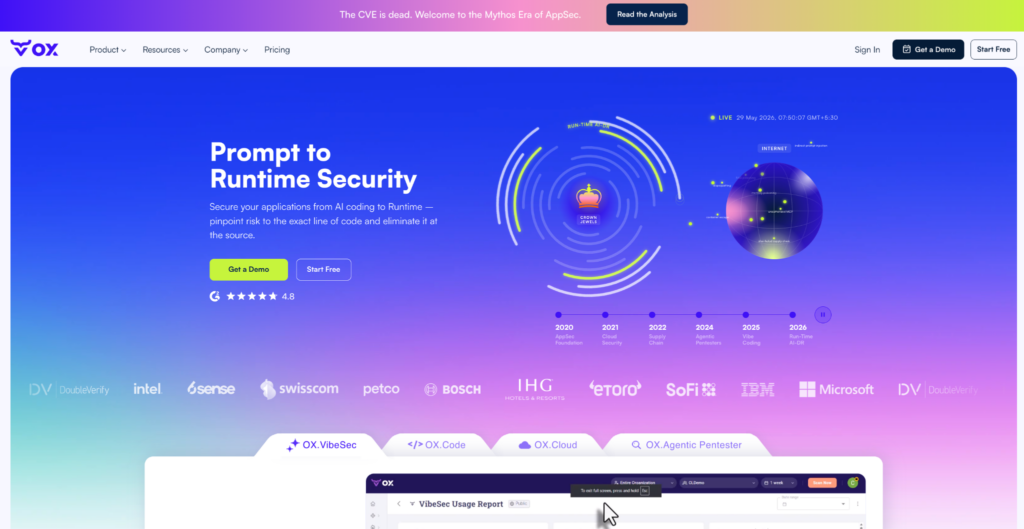
OX Security moves the first security checkpoint to the moment AI generates code, which catches vulnerabilities before they reach a commit and keeps visibility running through build pipelines and into production.
Unlike tools that collect alerts after code is written, OX moves the first security checkpoint to the moment of generation. OX VibeSec embeds security directly into AI coding assistants like Cursor and Copilot, and governs which agents, Model Context Protocol (MCP) servers, skills, and packages are permitted to run at all, so risks are eliminated before they ever reach the pipeline.
From there, the OX AI-native application protection platform (AINAPP) carries that coverage through every stage: OX Code validating what shipped across the full SDLC, OX Cloud connecting code-level findings to runtime and cloud, and OX Agentic Pentester actively identifying exploitable vulnerabilities on demand and connecting those issues to code-level risks, so protection stays aligned with development speed without compromising delivery.
Key features
- Integrated Signal Layer: OX connects to your existing toolchain – dependency scanners, IaC validators, secret monitors, SAST, SCA, and cloud posture tools – and pulls their output into one view. Incumbent tools like Snyk, Checkmarx, and Prisma can run alongside OX’s own scanners, with overlapping findings correlated and deduplicated automatically. The result is one clean, accurate posture view instead of five dashboards saying different things.
- Contextual Risk Prioritization: Not every vulnerability deserves a ticket. OX scores findings against reachability, exploitability, and business impact; surfacing the small subset that could actually be leveraged in your environment. Teams can stop triaging noise and start fixing threats that matter.
- Workflow Integration: OX routes findings to where developers already work. Via OX Workflows and Connectors, issues flow into Jira and Slack with context attached –the affected repository, severity, recommended fix – so remediation moves without context switching or manual handoffs.
- Posture Analytics and Reporting: Dashboards track attack paths, policy compliance, and mean-time-to-remediation trends over time. Reports are audit-ready out of the box, giving security leaders and auditors a consistent view of how posture is shifting rather than a snapshot of open issues.
- AI Tooling Governance: OX VibeSec maintains an inventory of the AI coding assistants, agents, MCP servers, skills, and packages in use across the organization, controls which of them may run and with what permissions, and steers code away from insecure patterns as it is generated rather than flagging them after commit.
Hands-on Example: Putting ASPM to Work Using OX Security
The demo connects a repository to OX, runs a pipeline scan, ingests results, and visualizes attack path reachability, ending with an automated Jira ticket for high-priority findings.
The demo stack: A sample microservices app with a Node.js/Express backend, React frontend, MongoDB, and Terraform-provisioned Kubernetes on AWS, a realistic enterprise setup with containers and CI/CD pipelines.
Prerequisites
- OX account with org admin access.
- OX API key with API Integration scope.
- A GitHub repository.
- (Optional) Jira project for ticket automation.
Step 1: Create your org and API key
Log in to https://app.ox.security/ and create your organization. Then go to Settings -> API Key Settings -> CREATE API KEY. Name it, select API Integration as the key type, and copy the secret. This is the only time you’ll see it.
Step 2: Connect GitHub
Go to Connectors -> Source Control -> GitHub. Connect via the GitHub App (recommended) or a personal access token. Select the repositories you want OX to monitor and save.
Step 3: Add OX scanning to your CI pipeline
The OX GitHub Action runs a full security scan, covering secrets, SAST, SCA, IaC, and more, on every push or pull request, evaluating results against your defined security policies. If a blocking issue is detected, the workflow fails unless overridden.
# .github/workflows/scan.yml
name: Security Scan

on:
  push:
    branches: [main]
  pull_request:
    branches: [main]

jobs:
  scan:
    runs-on: ubuntu-latest
    steps:
      - name: Checkout repository
        uses: actions/checkout@v3

      - name: OX Security Scan
        uses: oxsecurity/ox-security-scan@main
        with:
          ox_api_key: ${{ secrets.OX_API_KEY }}
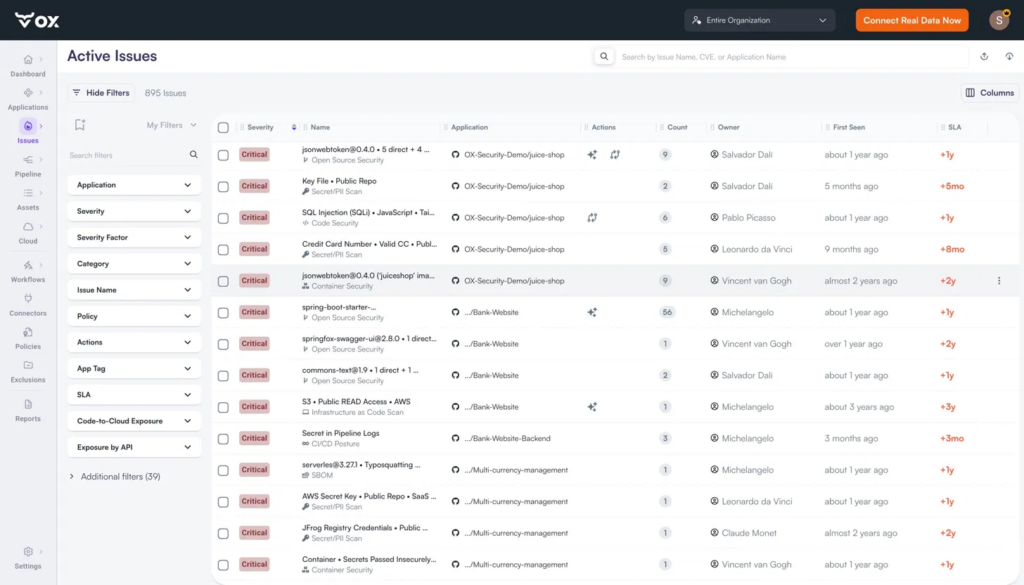
Once the scan completes, findings appear immediately in the Active Issues view, prioritized by severity, mapped to the owning application and developer, with SLA breach indicators and filter dimensions including Code-to-Cloud Exposure and Exposure by API.
Step 4: Ingest third-party scanner results
If you’re running additional scanners alongside OX, push their output via the API using base64-encoded file content:
curl -X POST \
  https://api.cloud.ox.security/api/apollo-gateway \
  -H 'Content-Type: application/json' \
  -H 'Authorization: <OX_API_KEY>' \
  -d '{
    "query": "mutation UploadThirdPartyFileBase64($data: String!, $tool: String!, $fileType: ThirdPartyUploadDataType) { uploadThirdPartyFileBase64(data: $data, tool: $tool, fileType: $fileType) { requestId success } }",
    "variables": {
      "data": "<base64 encoded file content>",
      "tool": "<your-scanner-name>",
      "fileType": "JSON"
    }
}'| Variable | Description |
|---|---|
| data | Your scanner output is encoded as a Base64 string |
| tool | Any string identifying the originating tool (e.g., “Snyk”, “Semgrep”) |
| fileType | JSON for OX-format uploads; SARIF for SARIF uploads. Must be set explicitly, if omitted, the file defaults to a Policy file, and imported issues will not appear |
Note: After uploading, you must run a scan for the imported issues to be registered in your organization. Issues will not appear in Active Issues until after the next scan completes. Refer to the “Importing Issues from External Systems” doc for the required JSON schema.
Step 5: View Attack Path and Reachability
Go to Active Issues and then select any Issue (in the current snapshot below ), then select the Attack Path view.
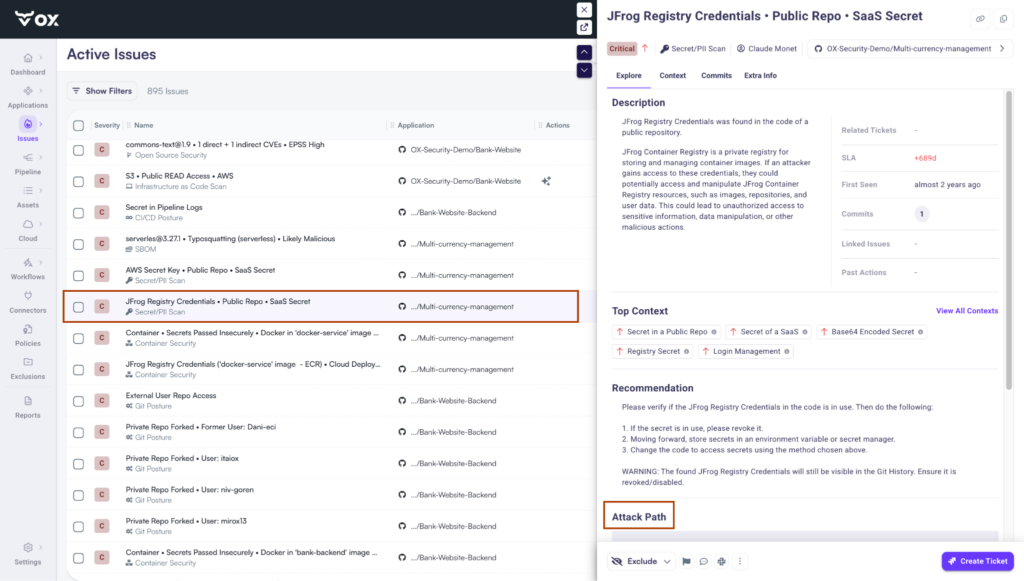
OX maps the full blast radius of each critical finding, from the detection signal and severity factors through the affected application, out to every API, artifact, and downstream connected service.
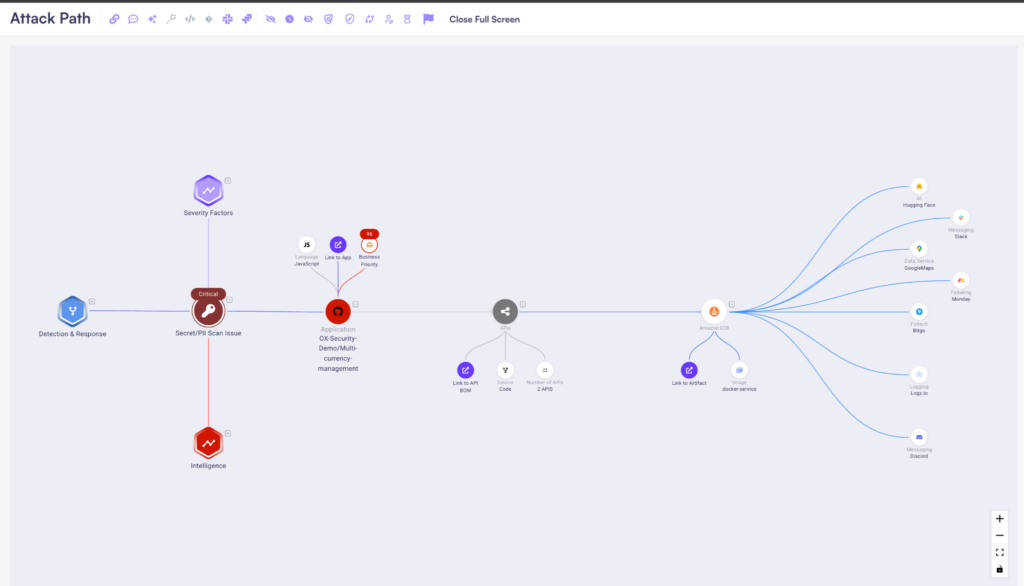
A Critical Container Security Issue in the Multi-currency-management app is traced through its APIs and Amazon ECR artifact all the way to connected SaaS services, including Slack, Hugging Face, Google Maps, Monday, and Logz.io, showing exactly what’s reachable if this vulnerability were exploited.
Step 6: Automate Jira tickets and remediation workflows
Configure the Jira connector under Connectors, select Ticket Management, and then open Jira. Once connected, use OX Workflows to automate remediation actions on triggers, no code required:
- On issue.created AND severity >= high -> create Jira ticket + set 3-day SLA
- On issue.reachable == true -> tag as reachable + notify Slack channel
From 22,333 Alerts to 440 Reachable Issues
After connecting the repository, running the pipeline scan, and ingesting results, the OX dashboard shows exactly what that flow produced. 22,333 raw alerts from across the stack, aggregated to 11,384, then prioritized down to 440 issues that are reachable and business-impactful. Only 166 are tracking against an active SLA breach.m across the stack, aggregated to 11,384, then prioritized down to 440 issues that are reachable and business-impactful. Only 166 are tracking against an active SLA breach.
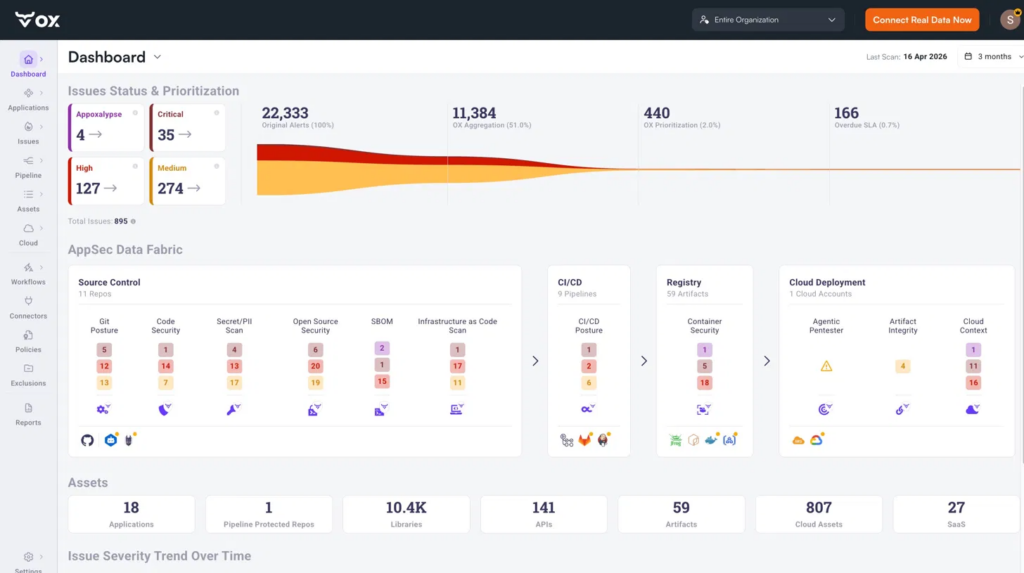
That coverage spans the full demo stack, from source control and CI/CD pipelines to container registries and cloud deployments, all correlated in the OX context lake – the shared store that gives every finding its full lineage – as shown in the snapshot above. The Attack Path then connects those findings to the specific APIs, artifacts, and downstream services they can impact, helping teams prioritize high-severity reachable issues and surface them in Jira for remediation.
Pros
- Prevention Before Detection: OX stops insecure code at the moment of generation via Cursor and Copilot, a fundamentally different starting point than shift-left.
- Full Lifecycle Coverage: OX VibeSec, OX Code, OX Cloud, and OX Agentic Pentester cover prompt to runtime without separate tools.
- Attack Path Context: The reachability graph shows what’s actually exploitable and what it connects to, not just severity scores.
- Remediation Built In: Findings route to Jira automatically via OX Workflows with SLA tracking and Slack notifications.
- Pipeline-Level Enforcement: Security policies block risky merges without requiring developer context switches.
Cons
- Integration Effort: Full visibility requires connecting repositories, CI/CD pipelines, and cloud environments.
- Cost at Smaller Scale: May be a significant investment for smaller teams and startups.
- Ramp-up: Teams new to AppSec risk prioritization may need time to use the platform fully.
2. Apiiro

Overview
Apiiro is an ASPM platform built with a developer-first approach and a strong focus on contextual risk analysis. Where platforms that treat all vulnerabilities equally leave triage to the reader, Apiiro enriches findings with application, supply chain, and business context, helping enterprises prioritize the issues that truly matter. Its architecture continuously tracks code changes, dependencies, and configurations across repositories and pipelines, creating a dynamic inventory of applications and associated risks.
Key Features
- Application and Supply Chain Inventory: Apiiro builds a detailed inventory of applications, code components, and dependencies from design through runtime. That gives teams one source of truth for the software supply chain, and makes ownership and risk traceable across distributed systems.
- Contextual Risk Prioritization: Findings are scored on exploitability, reachability, and business impact, not on technical severity alone. That context is what narrows the queue to vulnerabilities capable of materially affecting the organization.
- Open Integration Model: The platform integrates with existing developer tools, security scanners, and productivity platforms. Enterprises are not locked into proprietary scanning engines and can reuse existing investments in SAST, DAST, SCA, and IaC.
- Shift-Left and Monitoring: Apiiro detects risks as early as ticket creation or the design stage and monitors applications as changes move from code through build and deployment pipelines.
- Collaboration and Governance Features: Policy-driven workflows, ownership mapping, and dashboards connect security leaders and development teams, so risks can be assigned, tracked, and remediated with clear accountability.
- AI Code Governance: Apiiro has consolidated its product line under Guardian Agent, which applies patent-pending Secure Prompt technology to rewrite developer prompts in real time so AI coding agents generate compliant, non-vulnerable code. Apiiro positions it as a control plane for agentic development security, and as the next evolution of its earlier AutoFix Agent (Apiiro, Jan 2026).
Hands-on Example: Implementing ASPM in Pull Requests and Pipelines using Apiiro
Connect your source control and CI/CD pipelines to the ASPM platform, allow PR guardrails and pipeline scans, and run targeted pull-request tests that feed findings into the platform’s risk graph. Normalize and correlate scanner outputs across SAST, SCA, IaC, and runtime, identify external-reachable and exploitable issues, and establish automated workflows to create tickets or block merges.
The demo focuses on a single PR → scan → risk-graph → enforcement loop to show the end-to-end posture workflow.
- Install & connect: Install the Apiiro Application Security Platform GitHub App (or connect via your Apiiro tenant) and authorize the target repositories/org so Apiiro can observe PRs, commits, and pipeline metadata.

- Create Your Apiiro Tenant + Connectors: Log in to your Apiiro workspace, add the SCM connector (GitHub/GitLab) and your CI provider (GitHub Actions/Jenkins/GitLab CI). Ensure the connectors have repository and workflow scopes so Apiiro receives PR and pipeline context.
- Simplify pull-request Guardrails & Material-change Detection: Turn on Apiiro’s PR guardrails (risk-based checks) so each PR is automatically analyzed for reachable/exploitable changes and supply-chain risks before merging. Configure thresholds that will block or flag high-risk PRs.
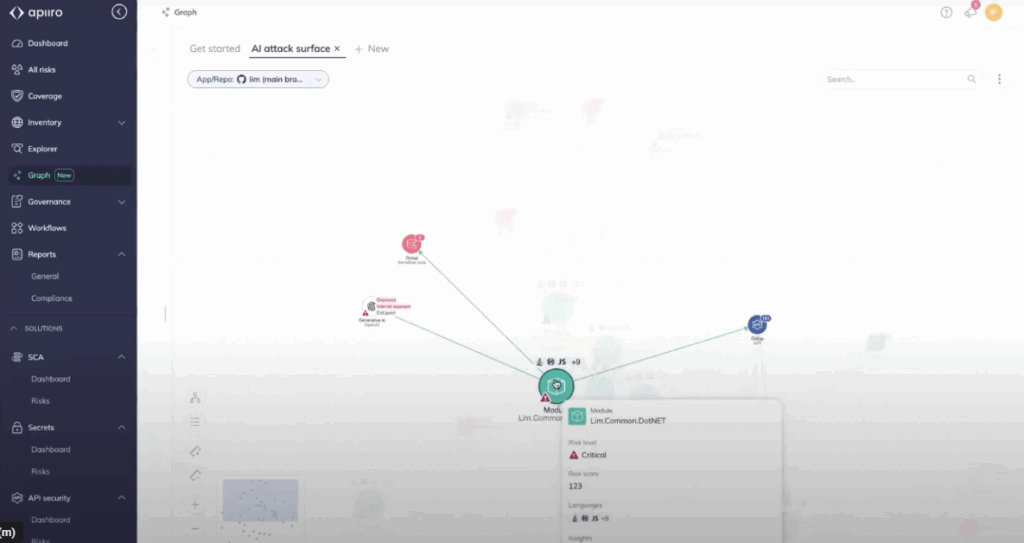
- Trigger a PR Scan and Review the Risk Graph: Open a test PR with a code or dependency change. Apiiro will scan and populate its Risk Graph (code → APIs → runtime), showing prioritized, reachable risks you can triage in the UI. Use the Risk Graph view to demonstrate how Apiiro deduplicates scanner noise and highlights business-important issues.
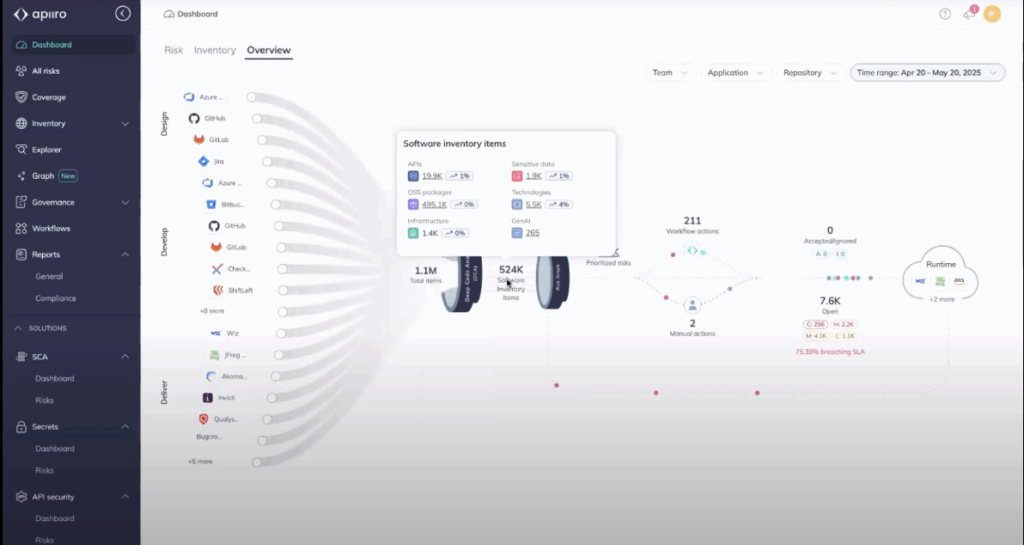
- Automate Remediation & Enforcement: Configure Apiiro workflows or connectors (e.g., Jira, ServiceNow) to automatically create tickets for high-priority findings and enforce merge/pipeline blocking for policy violations. Show a sample flow: PR → Apiiro blocks merge on high risk → ticket created in Jira for the assigned owner.
Result
You get a single source of truth: deduplicated findings mapped to code, APIs, and runtime, with contextual risk scores that highlight the small subset of vulnerabilities that truly matter. High-risk, reachable issues are automatically triaged and turned into tracked remediation tasks or pipeline blocks, removing developer noise and lowering mean-time-to-remediation. The outcome is clearer prioritization, an enforceable merge-time policy, and measurable posture improvement across repositories.
Pros
- Holistic Visibility Across the Lifecycle: By tracking applications from design to runtime, Apiiro surfaces risk at multiple stages, reducing the likelihood of important vulnerabilities slipping into production.
- Reduced Tool Lock-In: Its open integration model lets organizations bring their own scanners, which protects existing investments and reduces migration friction compared with closed ecosystems.
- Developer-First Adoption: With integration into GitHub, GitLab, and ticketing systems, developers get feedback in their own workflow rather than in a separate dashboard, which speeds remediation and improves adoption.
- Business Context in Security Decisions: Apiiro maps technical findings to business impact, so leadership can weigh security work against other engineering initiatives. That matters most in regulated industries, where risk has to be quantified.
Cons
- Setup Complexity: Because Apiiro builds a deep inventory and integrates with multiple scanners, onboarding is resource-intensive. Organizations have to dedicate engineering effort to connecting systems and tuning policies.
- Cost at Scale: For enterprises managing hundreds of repositories and pipelines, Apiiro’s monitoring breadth becomes expensive. Budget and ROI assessment belong in the procurement conversation.
- Delayed Value for Less Mature Teams: Enterprises with limited existing AppSec practices may struggle to extract immediate value, since Apiiro’s benefits are realized once contextual integrations are fully established.
- Learning Curve for Risk Modeling: Teams new to business-contextual security may need training to effectively use ownership mapping, policy workflows, and risk prioritization features.
3. ArmorCode
Overview
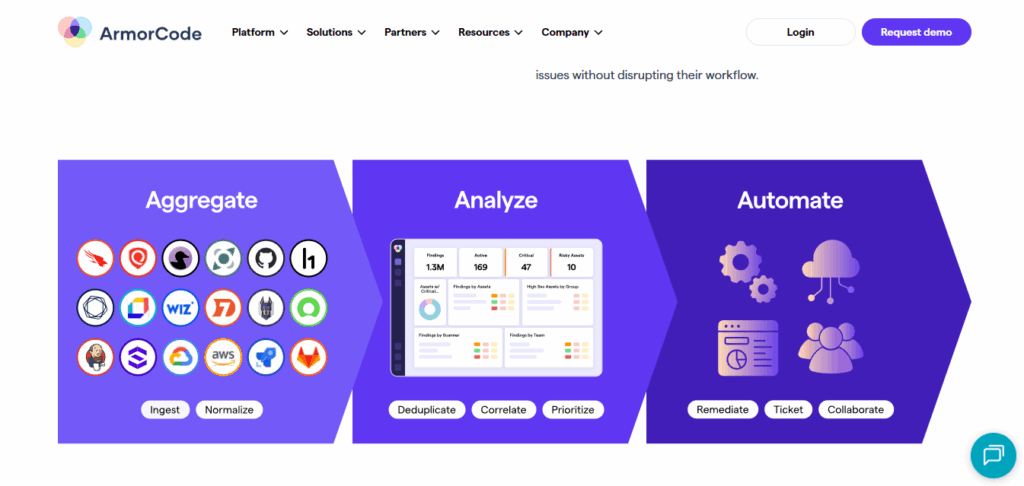
ArmorCode is a centralized ASPM and AppSec orchestration hub. It does not replace scanners; it sits above them as a unifying control plane, ingesting results from SAST, DAST, SCA, cloud, and bug bounty platforms.
Its focus is visibility, governance, and compliance reporting at enterprise scale, across hundreds of tools, repositories, and teams.
Key Features
- Centralized AppSec Orchestration: ArmorCode consolidates vulnerability data from diverse sources into a single view, so AppSec teams can correlate issues across scanners and enforce governance policy consistently.
- Integration Marketplace: Supports dozens of security scanners – SAST, DAST, SCA, IaC, cloud posture tools – alongside developer collaboration platforms such as Jira and Slack, which is how enterprises get return on tools they have already bought.
- Compliance and Governance Dashboards: Out-of-the-box dashboards cover SOC 2, HIPAA, PCI DSS, and other frameworks, mapping vulnerabilities and remediations directly to compliance controls so audit preparation is not a separate exercise.
- Workflow Automation and Alerting: Rules and policies automate ticket creation, routing, and escalation, which removes manual triage and puts each vulnerability in front of the developer or team that owns it.
- Agentic AI Workers: Anya Agents build on ArmorCode’s Context Risk Graph to provide named, purpose-built workers – Security Analyst, Vulnerability Researcher, Risk Analyzer, Zero-Day Hunter and Patch Orchestrator among them – each acting within bounds the security team sets, with every action auditable and exceptions approved by a person.
Hands-on Example (Scanner Integration)
Connect your code and CI to ArmorCode, ingest scanner output, run a PR/CI scan to build ArmorCode’s risk graph, and wire automated remediation (Jira/ServiceNow) so policy enforcement happens at merge-time.
Step 1: Create a tenant and API key
Sign in to your ArmorCode tenant, create an organization, then generate an API key for integrations (API/ingest scope). Keep the token in your CI secrets store.

Step 2: Connect source control and CI providers
Install/authorize the ArmorCode GitHub app (or add GitLab/Jenkins connectors) so ArmorCode can observe PRs, commits, and pipeline metadata. Verify repository and workflow scopes during the install.
Step 3: Run scanner in CI and ingest findings into ArmorCode
Add a CI job that runs your SAST/SCA/DAST tool (example below uses Snyk) and pushes the JSON result to ArmorCode via the tenant import API or a built-in connector. Replace the upload URL with your tenant’s import endpoint.
# .github/workflows/aspmscan.yml (minimal)
name: aspmscan
on: [pull_request]
jobs:
  scan:
    runs-on: ubuntu-latest
    steps:
      - uses: actions/checkout@v4
      - name: Run Snyk
        run: snyk test --json > snyk-report.json
        env: SNYK_TOKEN: ${{ secrets.SNYK_TOKEN }}
      - name: Upload to ArmorCode (example)
        run: |
          curl -X POST -H "Authorization: Bearer $ARMOR_TOKEN" \
              -F "file=@snyk-report.json" \
              "https://<your-armor-host>/api/v1/import/snyk"
        env: ARMOR_TOKEN: ${{ secrets.ARMOR_TOKEN }}
Use the built-in connectors where available; ArmorCode supports 400+ integrations and also gives an API/GraphQL interface for custom ingestion.
Step 4: Open the Risk / AI insights view and triage reachable issues
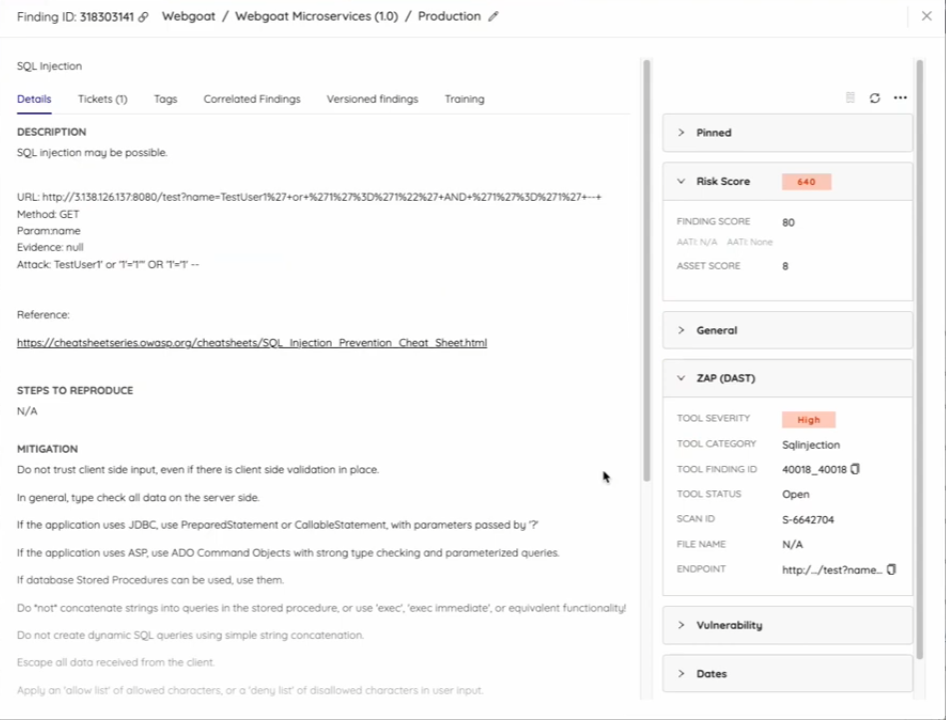
In the ArmorCode console, open the application or PR context and inspect the AI-driven risk graph (code → dependency → runtime mapping). Prioritize items marked reachable/exploitable and validate suggested remediation steps. The platform displays de-duplicated findings together for faster triage.

Step 5: Automate enforcement and remediation workflows
Configure the ArmorCode Jira or ServiceNow connector to automatically create tracked tickets for high-risk findings and optionally block merges or CI progression according to policy. Verify SLA fields and assignment mapping so issues flow to the right owners.
Result
You get a single, enterprise-grade posture view where scanner noise is de-duplicated and mapped into an AI-enriched risk graph, exposing reachable and business-impacting issues. Automated tickets and pipeline enforcement ensure high-risk findings are tracked or blocked before merge, shrinking remediation cycles and producing auditable posture metrics.
Pros
- Combined Visibility: ArmorCode’s strongest capability is merging data from numerous security tools into one source of truth rather than several dashboards, which cuts duplication and produces a clearer remediation backlog.
- Compliance-Driven Reporting: Regulated enterprises value ArmorCode’s audit-ready dashboards, which map vulnerabilities and fixes directly to compliance frameworks, lowering audit preparation effort and improving executive reporting.
- Extensive Integration Ecosystem: Dozens of prebuilt connectors reduce the friction of plugging in existing scanners and workflows, so security leaders can orchestrate without forcing teams off their current toolchains.
Cons
- Less Developer-First Orientation: ArmorCode is strong for AppSec managers and compliance officers but less embedded in developer workflows than Snyk or Apiiro. Developers rely on ticketing integration rather than in-IDE feedback.
- Heavy Reliance on Integrations: Its orchestration model is powerful but only as good as the third-party integrations underneath it. A missing or shallow connector for a key scanner erodes the platform’s value.
- Opaque Enterprise Pricing: ArmorCode is positioned for large enterprises and prices only through sales engagement, which is a barrier for smaller teams and for anyone wanting transparent tiering.
4. Snyk ASPM
Overview
Snyk, best known for developer-first SCA and container security, has expanded into ASPM. The offering extends Snyk’s familiar developer experience across open-source dependencies, IaC, containers, and application posture, embedding checks in developer workflows while giving security teams enterprise-wide posture dashboards.
Key Features
- Developer-First Scanning: Tight integration with GitHub, GitLab, Bitbucket, and IDEs lets developers find and fix issues in real time, which is the whole of Snyk’s “shift-left” argument.
- Unified ASPM Dashboards: Extends beyond SCA to include IaC misconfigurations, container vulnerabilities, and open-source risks, providing a unified posture view for security teams.
- CI/CD Integration: Supports scanning within CI pipelines (GitHub Actions, GitLab CI, Jenkins) to ensure code and dependencies are checked continuously during builds and deployments.
- Policy Enforcement: Enterprises define risk thresholds and enforce merge and pipeline policies when important vulnerabilities are detected, reducing the likelihood of insecure releases.
- Collaboration and Reporting: Integrates with Jira and Slack for ticketing and developer collaboration, with separate dashboards for AppSec and leadership reporting.
- AI and Agent Security: The Snyk AI Security Platform now centers on Evo, its agentic layer. Evo AI-SPM reached general availability at RSAC 2026 and maintains a live AI Bill of Materials, and Evo Continuous Offensive Security has since joined it; agent governance through Agent Scan and CLI red-teaming remains in open preview, and Agent Guard in private preview.
Hands-on Example
Install the Snyk Security for Jira Cloud app and connect it to your Snyk Organization as well as your code repositories. This enables Jira’s Security feature. Once connected, configure automation so that vulnerabilities are automatically created and reconciled as Jira issues. The five compact steps below cover permissions, installation, linking targets, ticket automation, and basic lifecycle management.
Step 1: Prerequisites and permissions
Ensure you are a Jira Cloud administrator (member of site-admins, administrators, or jira-administrators) and a Snyk Organization administrator. Grant the app the required Jira scopes: Write data to the host application, Read data from the host application, and Delete data from the host application. Project admin permissions are required to add containers to a project.
Step 2: Install the Snyk app in Jira Cloud
In Jira: Apps → Find new apps → search for “Snyk Security in Jira Cloud” (use the EU/AU or SNYK-US-02 variant if applicable). Click ‘Get it now’ and follow the marketplace installation flow. After installation, go to Apps → Manage apps → Snyk Security in Jira and sign in to your Snyk account.
Step 3: Connect Snyk Organizations and repositories to Jira projects
In the Snyk app within Jira, Grant access when prompted, select the Snyk Organization(s) to link, then use Project → Security → Connect security containers to pick Snyk Targets (repositories/containers) for that Jira Project. Repeat per project; issue syncing is asynchronous, so allow a short delay for vulnerabilities to appear.


Step 4: Configure Jira automation for vulnerability-to-issue flow
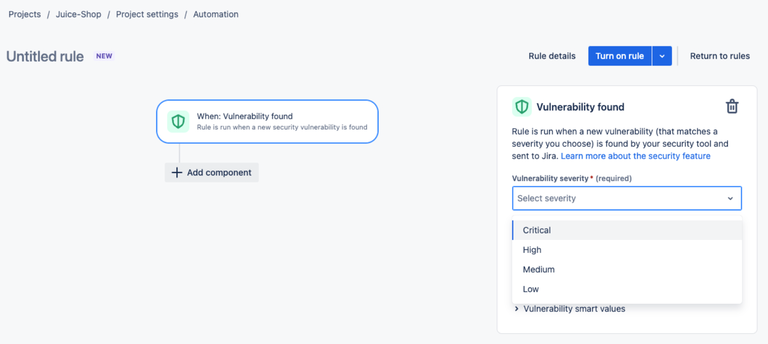
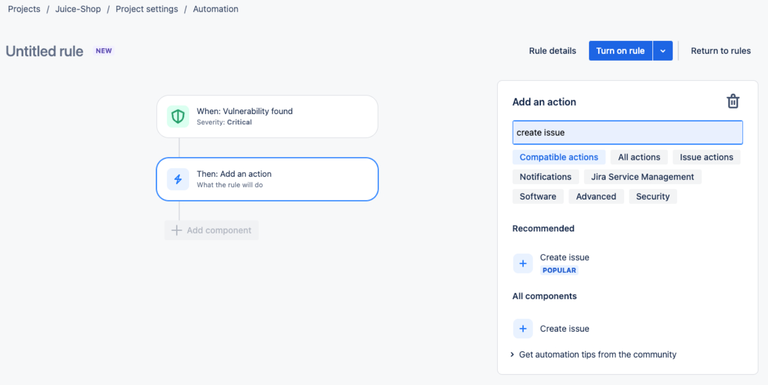
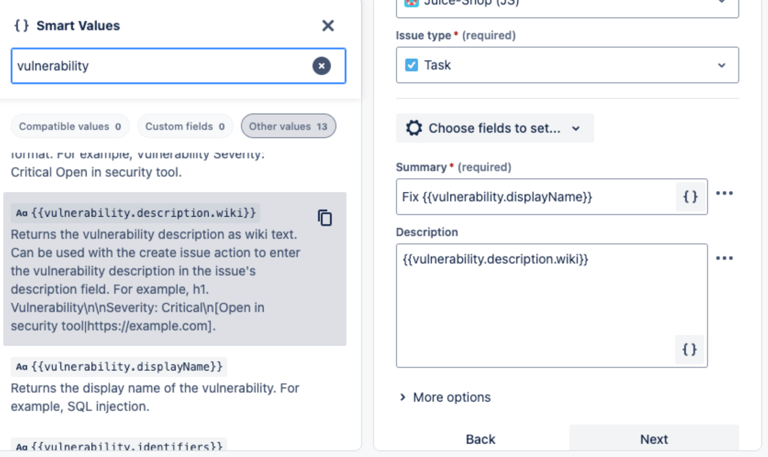
In Project Settings → Automation, create a rule: Trigger = Vulnerability Found (position minimum severity). Add Action = Create Issue (launch project, issue type, summary Fix {{vulnerability.displayName}}, description {{vulnerability.description.wiki}}). Then add Action = Link vulnerability to issue (Security). Turn on the rule to make vulnerability detection create tracked Jira work automatically.
Step 5: Maintain and reconcile lifecycle (linking, auto-close, deletion)
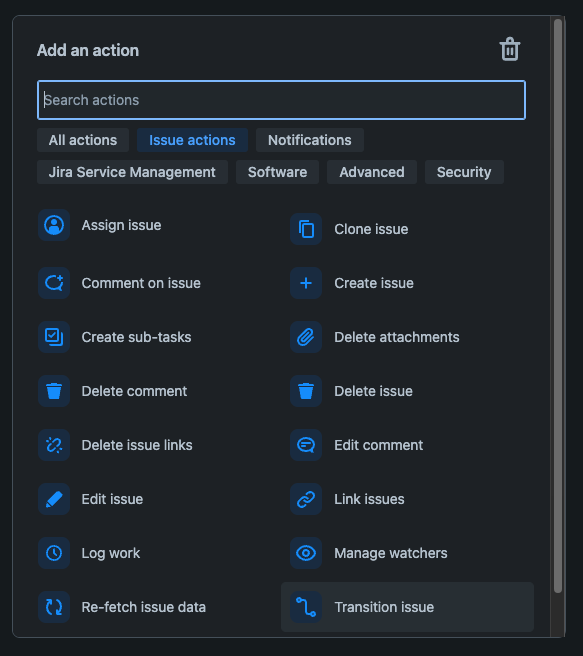
To link existing issues: from the Security tab, use the Actions menu → Link issue. To auto-close Jira issues when Snyk marks a vulnerability closed, create a Scheduled automation rule that runs a JQL search status != Done AND vulnerability[status] = CLOSED, then Action = Transition issue → Done. To remove a connected target, delete the container from the Jira Security panel first, then remove the repository/target from Snyk.



Pros
- Strong Developer Adoption: Snyk is already widely adopted among developers for SCA and container scanning, so extending into ASPM lets organizations build on existing familiarity and adoption, reducing training needs.
- Embedded in Developer Workflows: IDE extensions and Git-based integrations put feedback in front of developers in real time, which improves fix velocity against tools that rely on out-of-band dashboards.
- Expanding ASPM Coverage: Snyk has moved beyond open-source scanning into IaC and container posture, broadening the view of application risk.
Cons
- ASPM Capabilities Still Maturing: While strong in SCA and container scanning, Snyk’s ASPM layer is newer than incumbents like OX Security or ArmorCode, and AppRisk sits behind the Enterprise tier. Enterprises may find gaps in governance or reporting.
- Cost Escalation at Scale: Snyk pricing scales with developer and repository count, so ROI needs checking before ASPM adoption widens.
- Partial Coverage of Supply Chain: It integrates well with code and containers, but some runtime and pipeline posture elements still require supplemental tooling.
Market Insights: Where ASPM is Headed
The ASPM market has moved from niche experimentation to a central part of enterprise AppSec strategy. Three clear trends are shaping its direction in 2026:
1. Bringing Signals Together: ASPM as the Control Plane
AppSec tooling is fragmented. A single organization might run five or more scanners – SAST, DAST, SCA, IaC, container security – and without a unifying layer those findings stay scattered across dashboards.
ASPM has settled into the role of control plane for application security: scanner results normalized, prioritized, and governed centrally. That is not only a visibility gain, it is what makes consistent policy enforcement possible across diverse teams and tools.
2. AI and Automation: Predictive Risk Scoring and Self-Healing
Manual triage is no longer feasible at enterprise scale. ASPM vendors now use AI to predict which vulnerabilities are exploitable, which services they affect, and how urgent they are in business terms.
The next stage is self-healing policies, where remediation tasks are automatically generated, tickets are opened, and in some cases, patches or configuration changes are suggested proactively. That stage has arrived: every vendor in this comparison shipped agentic remediation or agent governance since the launch of ArmorCode’s Anya in April 2025; the differentiator has moved from whether a platform automates remediation to how far upstream it can act.
3. Enterprise Adoption Patterns: From Pilots to Full-Scale Programs
Most enterprises begin with pilot deployments across a handful of business-critical applications, then scale to hundreds of repositories and pipelines as integrations stabilize and policies are tuned. Regulated industries such as finance and healthcare adopt first, driven by compliance pressure.
SaaS and cloud-native enterprises follow closely, because ASPM embeds posture management into CI and CD workflows without slowing delivery.
Choosing the Right ASPM Tool for Your Organization
The right ASPM tool depends on the maturity of your existing AppSec program. Organizations with a well-established vulnerability management program but no centralized posture are usually best served by orchestration-heavy platforms such as ArmorCode or OX Security. Developer-first companies with strong DevSecOps practices tend to fit Apiiro or Snyk ASPM more closely.
The table below summarizes how the leading ASPM vendors compare across key enterprise evaluation criteria.
ASPM Tools Comparison Table (2026)
| Criteria | OX Security | Apiiro | ArmorCode | Snyk ASPM |
|---|---|---|---|---|
| Strength | AI-native application protection platform (AINAPP) governing prompt to runtime across four pillars: VibeSec, Code, Cloud, Agentic Pentester | Contextual risk analysis, developer-first | Centralized AppSec orchestration and compliance | Developer-first security with ASPM expansion |
| Integrations | Wide CI/CD, multi-branch, connectors for SCM and build systems | GitHub, GitLab, Bitbucket, major CI/CD | Large marketplace (SAST, DAST, SCA, cloud tools); 400+ integrations | GitHub, GitLab, IDEs, CI/CD |
| Risk Prioritization | Contextual + exploitability-based | Strong business context scoring | Context Risk Graph applied to ingested scanner data | Reachability-based, extended by Evo AI-SPM |
| Developer Experience | Good CI/CD and workflow automation | Strong shift-left; risk-based PR guardrails, plus Guardian Agent at generation time. | Governance-first; Anya Agents add in-workflow guidance | Excellent (IDE plugins, Git workflows) |
| AI / agentic code coverage | Governs the AI tooling layer itself: VibeSec controls which agents, MCP servers, skills, and packages may run, with what permissions, and steers code as it is generated | Guardian Agent as a control plane for AI coding agents; patent-pending Secure Prompt rewrites prompts at generation so agents produce compliant code | Anya Agents for triage, remediation, and validation; AI Code Insights for AI-generated code | Evo AI-SPM (GA) with live AI-BOM, plus Evo Continuous Offensive Security; Agent Scan and red-teaming in open preview, Agent Guard in private preview |
| Scalability (Enterprise Fit) | Strong: multi-repo, enterprise workflows | Strong for mid-to-large orgs | High: focused on governance at scale | Strong adoption, scaling enterprise features |
| Compliance and Governance | Policy enforcement, reporting | Policy-driven workflows | Very strong (audit, governance dashboards) | Moderate (growing capabilities) |
| Automation and Workflow Support | Advanced (policy enforcement, remediation workflows) | Policy-based automation | Workflow orchestration across scanners | Automated scanning in repos/CI/CD |
| Maturity of ASPM Offering | Established | Established | Mature (orchestration + ASPM) | Expanding (AppRisk plus Evo AI-SPM GA) |
| Best Fit For | Enterprises seeking full supply chain visibility | Dev-first orgs with strong DevSecOps culture | Enterprises prioritizing compliance/governance | Dev-first teams scaling into ASPM |
| Pricing | Per active developer; per-pillar packaging; quote-based; free trial available | Sales-led; not publicly listed | Sales-led; not publicly listed | Per developer, published tiers from $25/dev/month; free tier; AppRisk is Enterprise-only |
Conclusion
The ASPM market in 2026 is evolving beyond vulnerability aggregation and dashboard consolidation. Organizations now want platforms that connect risk to business impact, support remediation across teams, and hold visibility across the whole delivery lifecycle. Each platform here approaches that differently. ArmorCode and Apiiro focus heavily on risk correlation, governance, and security operations. Snyk remains a strong choice for developer-centric security workflows. OX Security takes a broader approach as a platform governing prompt to runtime, bringing together AI tooling governance, application security testing, cloud and runtime visibility, and on-demand adversarial validation within a single platform.
The best choice depends on your team’s priorities. Some organizations need stronger governance and risk management; others weight developer experience or supply chain visibility more heavily. As AI-generated code becomes the default rather than the exception, the platforms that matter will be the ones carrying context across the entire application lifecycle and narrowing the queue to the risks worth working.
FAQs
Look for four things: coverage that spans code, pipelines, cloud, and runtime; contextual prioritization that ranks findings on reachability and business impact rather than raw severity; native CI/CD and ticketing integration so remediation lands in the tools developers already use; and policy enforcement with audit-ready reporting for frameworks like SOC 2, HIPAA, and PCI DSS. In 2026, add one more: whether the platform can govern the AI assistants and agents writing the code, not just correlate the findings that code produces.
ASPM governs application risk – code, dependencies, pipelines, and artifacts – correlating scanner findings into one prioritized view. CSPM governs cloud infrastructure posture: misconfigured storage, over-permissive IAM, non-compliant resources. They meet at runtime, where an application finding only matters if the infrastructure exposes it. See ASPM vs CSPM for the full breakdown.
Most application security tools detect issues after code is written or deployed. OX streams live security intelligence into coding environments, pipelines, and runtime systems instead, so vulnerabilities are prevented rather than accumulated and fixed after release.
OX provides coverage across the entire software lifecycle. It governs the AI assistants and agents that generate code, stops vulnerabilities at the coding stage, monitors APIs and cloud infrastructure for misconfigurations, and maintains protection in runtime environments. This end-to-end posture ensures that each release remains aligned with organizational security requirements.
OX integrates with more than 100 security, CI/CD, and collaboration platforms. Enterprises connect existing tools, from scanners to ticketing systems, without disrupting established workflows.
OX is adopted across fintech, SaaS, and healthcare. Regulated enterprises value its compliance alignment, while cloud-native and developer-first organizations use VibeSec™ to cut security noise and embed posture management directly into development.
Adoption timelines vary. Most large enterprises begin with a pilot in one or two business-critical applications, refine policies, then scale across hundreds of repositories. Pilot-to-scale rollout typically takes six to twelve months, depending on integration complexity and the maturity of the existing AppSec program.